
How to Add JWT Authentication to Next.js App Router (2026)
Learn how to add JWT authentication to Next.js App Router — the right way. Covers httpOnly cookie storage, edge middleware with jose, and accessing JWT claims in Server Components.
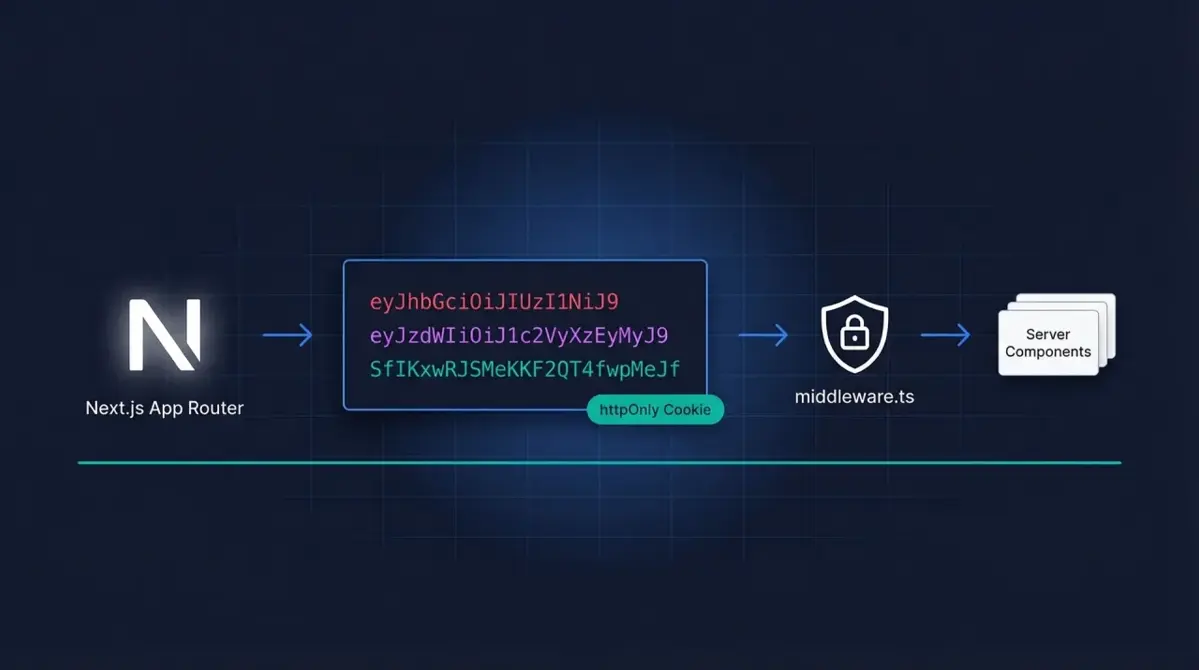
Why JWTs Are a Natural Fit for Next.js
Once your Next.js App Router project moves past a basic prototype, you hit the same question every developer hits: how do I know who’s making this request? JSON Web Tokens (JWTs) are the standard answer for Next.js JWT authentication. A JWT is a self-contained, cryptographically signed token that carries claims about the logged-in user. Because the token is stateless, there’s no database lookup on every request — your server verifies the signature and reads the claims directly. For a serverless or edge-deployed Next.js app, that’s a meaningful performance win.
In this guide you’ll build a complete Next.js JWT authentication system using the App Router, covering:
- Where to store JWTs safely (and what not to do)
- Verifying JWTs in
middleware.tsto protect routes at the edge - Accessing JWT claims inside Server Components
- How Authgear's Next.js SDK can handle all of this for you if you'd rather skip the boilerplate
How JWTs Work (Quick Recap)
Think of a JWT like a concert wristband. When you arrive at the venue (log in), staff check your ID and give you a wristband with your section printed on it. For the rest of the night, any staff member who sees the wristband knows exactly where you’re allowed to sit — without calling the ticket office every time.
Technically, a JWT has three Base64URL-encoded parts separated by dots: a header (the signing algorithm), a payload (claims such as user ID, email, and expiry), and a signature (the cryptographic proof that nobody tampered with it). When your Next.js server receives a request with a JWT, it re-computes the signature using your secret key and compares it to the one in the token. If they match, the payload can be trusted. For a deeper breakdown of the format, see our JWT Authentication guide, or inspect any token live with the Authgear JWT Debugger.
Where to Store JWTs Safely
Before writing any middleware, decide where the JWT lives on the client. The two common options are localStorage and httpOnly cookies. They are not equal.
| Storage method | Accessible via JS? | XSS risk | CSRF risk | Works in Server Components? |
|---|---|---|---|---|
| localStorage | Yes | High | Low | No |
| httpOnly cookie | No | Low | Medium (use SameSite) | Yes |
The recommendation is clear: use httpOnly cookies.
// ❌ DO NOT do this — localStorage is readable by any JavaScript on your page,
// including malicious third-party scripts injected via XSS.
localStorage.setItem('token', jwt);

// ✅ Instead, set the cookie server-side in a Route Handler or Server Action:
// (see the login handler below)
Warning: Storing JWTs in localStorage exposes them to Cross-Site Scripting (XSS) attacks. Any JavaScript running on your page — including a compromised npm package — can read localStorage and steal the token. An httpOnly cookie is invisible to JavaScript entirely, which removes that attack surface.
Setting an httpOnly Cookie on Login
Here’s a minimal Next.js Route Handler that verifies credentials, mints a JWT, and sets it as an httpOnly cookie. It uses jose, which is compatible with Next.js’s Edge Runtime — unlike the popular jsonwebtoken package, which relies on Node.js APIs not available at the edge.
// app/api/login/route.ts
import { NextRequest, NextResponse } from 'next/server';
import { SignJWT } from 'jose';

const JWT_SECRET = new TextEncoder().encode(process.env.JWT_SECRET!);

export async function POST(req: NextRequest) {
  const { email, password } = await req.json();

  // Replace this with your real user-lookup + password-check logic
  const user = await verifyCredentials(email, password);
  if (!user) {
    return NextResponse.json({ error: 'Invalid credentials' }, { status: 401 });
  }

  // Mint a JWT that expires in 24 hours
  const token = await new SignJWT({ sub: user.id, email: user.email, role: user.role })
    .setProtectedHeader({ alg: 'HS256' })
    .setIssuedAt()
    .setExpirationTime('24h')
    .sign(JWT_SECRET);

  const response = NextResponse.json({ success: true });

  // Set the cookie — httpOnly means JavaScript cannot read it
  response.cookies.set('token', token, {
    httpOnly: true,
    secure: process.env.NODE_ENV === 'production',
    sameSite: 'lax',
    path: '/',
    maxAge: 60 * 60 * 24, // 24 hours in seconds
  });

  return response;
}

// Stub — replace with your actual DB lookup
async function verifyCredentials(email: string, password: string) {
  // e.g. query your database and compare hashed passwords
  return null;
}
Verifying JWTs with Next.js Auth Middleware
Next.js middleware.ts runs at the edge — before any page or API route is rendered. This is the ideal place to enforce authentication: unauthenticated users are redirected immediately, without touching any app logic.
Important: Next.js middleware runs in the Edge Runtime, which does not support Node.js's
cryptomodule. Thejsonwebtokenpackage will throw at runtime in middleware. Usejoseinstead — it is a pure Web Crypto API implementation that works in the Edge Runtime, Service Workers, and browsers.
// middleware.ts (place this in the root of your project, next to package.json)
import { NextRequest, NextResponse } from 'next/server';
import { jwtVerify } from 'jose';

const JWT_SECRET = new TextEncoder().encode(process.env.JWT_SECRET!);

// Routes that require the user to be logged in
const PROTECTED_PATHS = ['/dashboard', '/settings', '/profile'];

export async function middleware(req: NextRequest) {
  const { pathname } = req.nextUrl;

  // Check if the current path needs protection
  const isProtected = PROTECTED_PATHS.some((path) => pathname.startsWith(path));
  if (!isProtected) {
    return NextResponse.next();
  }

  // Read the JWT from the httpOnly cookie
  const token = req.cookies.get('token')?.value;

  if (!token) {
    // No token — redirect to login
    const loginUrl = new URL('/login', req.url);
    loginUrl.searchParams.set('redirect', pathname);
    return NextResponse.redirect(loginUrl);
  }

  try {
    // Verify signature and expiry in one step
    const { payload } = await jwtVerify(token, JWT_SECRET);

    // Forward claims as request headers so Server Components can read them
    const requestHeaders = new Headers(req.headers);
    requestHeaders.set('x-user-id', String(payload.sub));
    requestHeaders.set('x-user-email', String(payload.email ?? ''));
    requestHeaders.set('x-user-role', String(payload.role ?? ''));

    return NextResponse.next({ request: { headers: requestHeaders } });
  } catch (err) {
    // Token is expired or tampered — clear the cookie and redirect
    const response = NextResponse.redirect(new URL('/login', req.url));
    response.cookies.delete('token');
    return response;
  }
}

// Tell Next.js which paths this middleware should run on
export const config = {
  matcher: ['/dashboard/:path*', '/settings/:path*', '/profile/:path*'],
};
A few things worth noting:
jwtVerifyfromjosechecks both the signature and the expiration claim (exp) in a single call. If either fails, it throws.- Forwarding claims as request headers (
x-user-id, etc.) lets Server Components and Route Handlers read user info without re-verifying the token on every render. - The
config.matcherarray limits where the middleware runs — no overhead on public pages or marketing routes.
Accessing JWT Claims in Server Components
Once middleware has validated the token and forwarded the claims as headers, any Server Component can read them with Next.js’s headers() function — no client-side JavaScript involved.
// app/dashboard/page.tsx
import { headers } from 'next/headers';

export default async function DashboardPage() {
  const headersList = await headers();
  const userId = headersList.get('x-user-id');
  const userEmail = headersList.get('x-user-email');
  const userRole = headersList.get('x-user-role');

  if (!userId) {
    // Middleware should have caught this, but a defensive check never hurts
    return <p>Not authenticated.</p>;
  }

  return (
    <main>
      <h1>Welcome back!</h1>
      <p>Logged in as {userEmail} (role: {userRole})</p>
    </main>
  );
}
If you need the full JWT payload rather than just the forwarded headers, re-read the cookie in a Server Component and call jwtVerify directly. The secret key never leaves the server:
// lib/auth.ts — a shared server-only helper
import { cookies } from 'next/headers';
import { jwtVerify, type JWTPayload } from 'jose';

const JWT_SECRET = new TextEncoder().encode(process.env.JWT_SECRET!);

export interface AuthUser extends JWTPayload {
  sub: string;
  email: string;
  role: string;
}

export async function getCurrentUser(): Promise<AuthUser | null> {
  const cookieStore = await cookies();
  const token = cookieStore.get('token')?.value;
  if (!token) return null;

  try {
    const { payload } = await jwtVerify(token, JWT_SECRET);
    return payload as AuthUser;
  } catch {
    return null;
  }
}
Then call it from any Server Component:
// app/profile/page.tsx
import { getCurrentUser } from '@/lib/auth';
import { redirect } from 'next/navigation';

export default async function ProfilePage() {
  const user = await getCurrentUser();
  if (!user) redirect('/login');

  return <p>Hello, {user.email}!</p>;
}
Using Authgear to Skip the Manual JWT Work
Rolling your own JWT infrastructure works well for learning, but production apps also need refresh token rotation, PKCE flows, logout across all devices, social login, MFA, and more. Each of those is a non-trivial piece of security-critical code.
Authgear’s @authgear/nextjs SDK handles all of this out of the box. You still get standard JWTs signed with your app’s JWKS, but the token lifecycle, cookie management, and middleware integration are pre-built. For teams that want to ship features rather than maintain an auth library, it’s the faster path. You can also combine it with our guide on implementing passkeys with WebAuthn to add passwordless login on top of JWT authentication.
Frequently Asked Questions
Why use jose instead of jsonwebtoken?
The jsonwebtoken package relies on Node.js’s built-in crypto module, which is unavailable in Next.js’s Edge Runtime (where middleware.ts runs). The jose library is built on the Web Crypto API, which is available in the Edge Runtime, Service Workers, and browsers. If you only use JWTs in Node.js API routes, jsonwebtoken works there — but jose is the safer, more portable choice across the full Next.js stack.
My JWT keeps expiring and logging users out. How do I handle refresh tokens?
Short-lived JWTs (15–60 minutes) are more secure than long-lived ones, but they require a refresh mechanism. The standard pattern: issue a short-lived access token (JWT) and a longer-lived refresh token stored in a separate httpOnly cookie. When the access token expires, middleware calls an internal /api/refresh route that validates the refresh token and issues a new access token — transparently, without logging the user out. This is one of the things that auth platforms like Authgear handle automatically.
Can I read the JWT in a Client Component?
If the JWT is stored in an httpOnly cookie, no — and that’s intentional. Client Components cannot access httpOnly cookies; that’s the whole point of the security model. If a Client Component needs user info (like a display name or avatar), the recommended approach is to expose a /api/me Route Handler that reads the cookie server-side and returns a JSON object with only the fields the client needs. Never expose the raw JWT to client-side JavaScript.
How do I protect API routes, not just pages?
You have two options. First, add your API prefix to the middleware matcher (e.g., /api/protected/:path*) — the middleware will verify the JWT before the Route Handler runs. Second, call getCurrentUser() at the top of each Route Handler and return a 401 if it returns null. The middleware approach is more efficient since it short-circuits at the edge; the in-handler approach gives you finer per-route control.
Next Steps
You now have a working Next.js JWT authentication pattern: httpOnly cookies for safe token storage, edge middleware for route protection, and a reusable server helper for reading claims. For a production-ready version with refresh tokens, social login, and MFA included, get started with Authgear’s Next.js SDK — it takes about 15 minutes to integrate and leaves you free to focus on building your product.