
Next.js Middleware Authentication: Protect Routes in App Router
Learn how Next.js middleware works, how to configure the matcher, validate JWTs at the edge, and redirect unauthenticated users — with the CVE-2025-29927 bypass covered.
middleware.ts was renamed to proxy.ts and the exported function renamed from middleware to proxy. This article uses Next.js 12–15 syntax. If you are on Next.js 16+, replace middleware.ts with proxy.ts and export function middleware with export function proxy — everything else in this guide applies unchanged. Vercel provides a codemod: npx @next/codemod@canary middleware-to-proxy .
Why Middleware Is the Right Place to Protect Routes
Imagine your Next.js app as a hotel. Every room is a route. You could put a lock on each individual room door — but that means copying the same lock logic into every page component. A smarter approach is to use Next.js middleware — station a security guard at the hotel entrance who checks every guest’s key card before they even reach the elevator.
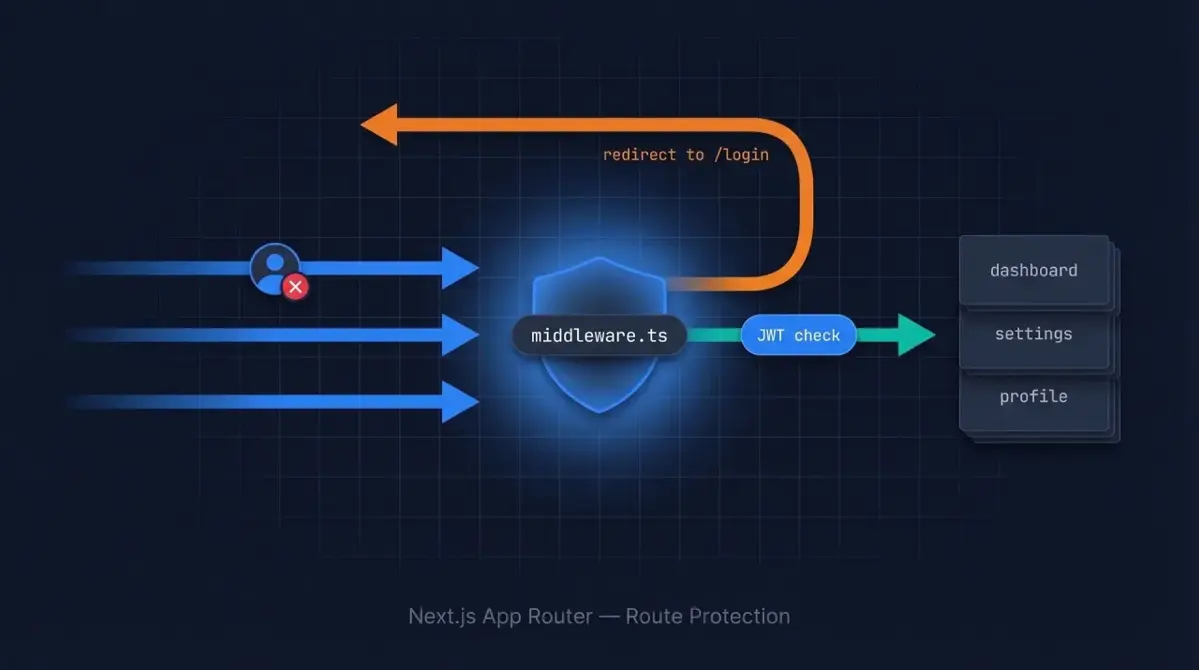
That’s exactly what middleware.ts does in Next.js. It runs on the server before any route is rendered, which means you can check whether a user is authenticated and redirect them — all in one central place, with zero duplication across your pages.
In this guide you’ll learn how Next.js middleware works, how to configure the matcher to target only the routes you care about, how to validate session tokens, how to redirect unauthenticated users, and — critically — how to avoid the most common traps like infinite redirect loops and accidentally running middleware on static assets.
How Next.js Middleware Works
Next.js middleware lives in a single file named middleware.ts (or middleware.js) at the root of your project, at the same level as the app/ or pages/ directory. Every incoming HTTP request passes through this file before Next.js renders any page or calls any route handler.
The execution order looks like this:
- Browser makes a request to your Next.js app
middleware.tsruns — it can inspect the request, set headers, rewrite the URL, or redirect- If middleware calls
NextResponse.next(), the request proceeds to your page component or route handler - If middleware calls
NextResponse.redirect(), the user is sent to a different URL immediately
Because middleware runs at the edge (close to the user, before your app server), it uses a lightweight runtime. This means you cannot use Node.js-only libraries like jsonwebtoken directly — instead you’ll use the jose library, which is edge-compatible.
// middleware.ts — minimal example
import { NextResponse } from 'next/server'
import type { NextRequest } from 'next/server'

export function middleware(request: NextRequest) {
  // Inspect the request, then decide what to do
  return NextResponse.next() // allow the request through
}
The Matcher Config — Targeting Only the Routes You Need
By default, middleware runs on every request — including requests for CSS files, images, and Next.js internals like _next/static. Running authentication logic on those is wasteful and can cause subtle bugs. The matcher config lets you tell Next.js exactly which paths should trigger your middleware.
Basic Matcher Patterns
// middleware.ts
export const config = {
  matcher: [
    // Protect everything under /dashboard and /settings
    '/dashboard/:path*',
    '/settings/:path*',
  ],
}
The :path* syntax means “zero or more path segments”. So /dashboard/:path* matches /dashboard, /dashboard/analytics, /dashboard/analytics/weekly, and so on.
Excluding Public Paths with a Negative Lookahead
A common pattern is to match everything except static assets and public paths. This is done with a regex negative lookahead:
// middleware.ts
export const config = {
  matcher: [
    /*
     * Match all request paths EXCEPT:
     * - _next/static (static files like JS, CSS)
     * - _next/image  (Next.js image optimization)
     * - favicon.ico, sitemap.xml, robots.txt
     * - files with extensions like .png, .jpg, .svg
     */
    '/((?!_next/static|_next/image|favicon\.ico|sitemap\.xml|robots\.txt|.*\.(?:png|jpg|jpeg|gif|svg|ico|webp)$).*)',
  ],
}
Think of this as the hotel guest list. Everyone gets checked — except the maintenance crew (static files) who have their own door around the back.
Matcher Reference
| Pattern | What it matches |
|---|---|
/dashboard |
Exactly /dashboard |
/dashboard/:path* |
/dashboard and all nested paths |
/api/:path+ |
All paths under /api/ (at least one segment) |
/((?!login|register).*) |
Everything except /login and /register |
Validating Sessions in Middleware
The most common approach is to store the user’s session token in an httpOnly cookie after they log in, then read and verify that cookie in middleware on every protected request.
Reading a Cookie in Middleware
import { NextResponse } from 'next/server'
import type { NextRequest } from 'next/server'

export function middleware(request: NextRequest) {
  // Read the session token from the cookie jar
  const token = request.cookies.get('session-token')?.value

  if (!token) {
    // No token — redirect to login
    return NextResponse.redirect(new URL('/login', request.url))
  }

  return NextResponse.next()
}
Verifying a JWT in Middleware
Checking that a cookie exists is not enough — a user could set a fake cookie. You need to cryptographically verify the JWT. Use the jose library, which works in the edge runtime. For a complete walkthrough of JWT setup and httpOnly cookie patterns, see our Next.js JWT authentication guide.
npm install joseimport { NextResponse } from 'next/server'
import type { NextRequest } from 'next/server'
import { jwtVerify } from 'jose'
const JWT_SECRET = new TextEncoder().encode(process.env.JWT_SECRET)
async function verifyToken(token: string): Promise<boolean> {
try {
await jwtVerify(token, JWT_SECRET)
return true
} catch {
// Token is expired, tampered with, or otherwise invalid
return false
}
}
export async function middleware(request: NextRequest) {
const token = request.cookies.get('session-token')?.value
if (!token || !(await verifyToken(token))) {
return NextResponse.redirect(new URL('/login', request.url))
}
return NextResponse.next()
}
export const config = {
matcher: ['/dashboard/:path*', '/settings/:path*', '/profile/:path*'],
}Redirecting Unauthenticated Users — A Complete Working Example
Below is a full middleware.ts that handles the three most common scenarios:
- Unauthenticated user tries to access a protected route → redirect to
/login - Authenticated user tries to access
/loginor/register→ redirect to/dashboard - All other requests → pass through unchanged
// middleware.ts
import { NextResponse } from 'next/server'
import type { NextRequest } from 'next/server'
import { jwtVerify } from 'jose'

const JWT_SECRET = new TextEncoder().encode(process.env.JWT_SECRET)

// Routes that require the user to be logged in
const PROTECTED_ROUTES = ['/dashboard', '/settings', '/profile']

// Routes that should redirect logged-in users away (e.g., to /dashboard)
const AUTH_ROUTES = ['/login', '/register']

async function getAuthenticatedUser(request: NextRequest): Promise<boolean> {
  const token = request.cookies.get('session-token')?.value
  if (!token) return false

  try {
    await jwtVerify(token, JWT_SECRET)
    return true
  } catch {
    return false
  }
}

export async function middleware(request: NextRequest) {
  const { pathname } = request.nextUrl
  const isAuthenticated = await getAuthenticatedUser(request)

  // Check if the current path starts with any protected route
  const isProtectedRoute = PROTECTED_ROUTES.some((route) =>
    pathname.startsWith(route)
  )

  // Check if the current path is an auth route (login/register)
  const isAuthRoute = AUTH_ROUTES.some((route) => pathname.startsWith(route))

  if (isProtectedRoute && !isAuthenticated) {
    // Save where the user was trying to go, so we can redirect after login
    const loginUrl = new URL('/login', request.url)
    loginUrl.searchParams.set('callbackUrl', pathname)
    return NextResponse.redirect(loginUrl)
  }

  if (isAuthRoute && isAuthenticated) {
    // Already logged in — no need to show login page
    return NextResponse.redirect(new URL('/dashboard', request.url))
  }

  return NextResponse.next()
}

export const config = {
  matcher: [
    '/((?!_next/static|_next/image|favicon\.ico|sitemap\.xml|robots\.txt|.*\.(?:png|jpg|jpeg|gif|svg|ico|webp)$).*)',
  ],
}
Notice the callbackUrl query parameter — this lets your login page redirect the user back to the page they originally wanted after a successful login, which is a much smoother experience.
Using Authgear for Next.js Authentication
If you’re using Authgear as your authentication provider, the @authgear/nextjs package handles token verification, session refresh, and auth state management without you having to wire it up manually.
npm install @authgear/nextjsOnce installed, you protect routes in middleware the same way as above — using Authgear’s session cookie and the standard JWT verification pattern. The package also provides server-side helpers like currentUser() that you can use in Server Components and Route Handlers to fetch the authenticated user without re-verifying the token yourself.
One of the trickiest parts of rolling your own auth is token refresh — when the user’s access token is close to expiring, you need to silently exchange it for a new one using the refresh token so users stay logged in without being interrupted. Authgear handles this transparently.
For full setup instructions including environment variables and the login page implementation, see the Authgear Next.js quickstart guide.
Common Pitfalls
Pitfall 1: The Infinite Redirect Loop
If your middleware redirects unauthenticated users to /login, but /login itself is matched by your middleware, the redirect will loop forever. The browser will show an “ERR_TOO_MANY_REDIRECTS” error.
The fix: Make sure your login and register pages are either excluded from the matcher pattern, or handled with an explicit early return in your middleware logic (as shown in the complete example above, where isAuthRoute paths pass through when the user is not authenticated).
// BAD: /login is caught by this matcher, causing a loop
export const config = {
  matcher: ['/:path*'],
}

// GOOD: /login and /register are excluded from the matcher
export const config = {
  matcher: ['/((?!login|register|_next/static|_next/image|favicon\.ico).*)',],
}
Pitfall 2: Running Middleware on Static Assets
If your matcher is too broad (e.g., /:path*), middleware runs on every request for every image, font, and CSS file. This adds latency to every asset load and can cause visual bugs if your middleware accidentally returns a redirect for a CSS file. Always exclude _next/static, _next/image, and common file extensions from your matcher.
Pitfall 3: Middleware Is Not a Complete Security Boundary
In March 2025, a critical vulnerability (CVE-2025-29927, CVSS 9.1) was disclosed in which middleware could be bypassed entirely by sending a crafted x-middleware-subrequest header. This affected self-hosted Next.js deployments running next start — Vercel and Netlify deployments were not affected. The vulnerability was patched in versions 12.3.5, 13.5.9, 14.2.25, and 15.2.3. Always run a patched version of Next.js.
More importantly, treat middleware as a first line of defense — a UX convenience that prevents most unauthorized access — but always re-verify authentication in your Server Components and API route handlers before exposing sensitive data. Defense in depth is the right approach. Read more about how JWTs work to understand why token verification at the data layer matters.
Pitfall 4: Using Node.js-Only Libraries
Middleware runs in the Edge Runtime by default, which does not support many Node.js APIs. If you try to use jsonwebtoken, crypto (the Node.js module), or database clients like Prisma directly in middleware, you’ll get a runtime error. Use edge-compatible alternatives:
| Task | Node.js-only (avoid in middleware) | Edge-compatible (use instead) |
|---|---|---|
| JWT verification | jsonwebtoken |
jose |
| Hashing / crypto | crypto (Node module) |
Web Crypto API (crypto.subtle) |
| Database queries | Prisma, Mongoose | Move queries to Server Components or Route Handlers |
As of Next.js 15.2+, you can opt middleware into the Node.js runtime by adding runtime: 'nodejs' to your config export (stable since Next.js 15.5). This removes the Edge Runtime limitation, but middleware will no longer run at the CDN edge layer — it runs on your app server instead.
// middleware.ts — opt into Node.js runtime (Next.js 15.2+, stable in 15.5)
export const config = {
  runtime: 'nodejs', // enables full Node.js APIs, disables CDN-edge execution
  matcher: ['/dashboard/:path*'],
}
FAQ
Can I use middleware to protect API routes as well as pages?
Yes. Your matcher can include /api/:path* alongside page routes. In that case, returning NextResponse.json({ error: 'Unauthorized' }, { status: 401 }) is better than a redirect, since API clients typically expect JSON error responses rather than HTML redirect pages.
What’s the difference between using middleware vs. checking auth inside each page component?
Middleware runs before the page renders and can redirect without rendering any React at all, making it faster and more efficient. Checking auth inside each page component is slower (the page starts rendering before you can redirect) and requires you to copy the same logic into every protected page. Use middleware as your first guard, but also check auth in Server Components for sensitive data fetches — never rely solely on middleware for security.
Does middleware run during client-side navigation in Next.js?
In the App Router, client-side navigations fetch React Server Component (RSC) payloads from the server. Middleware does run for these RSC requests, so your auth checks apply to both initial page loads and subsequent navigations. One thing to know: Next.js strips internal RSC headers (like next-router-prefetch) from the request object inside middleware to prevent you from accidentally treating RSC fetches differently from HTML requests — and you should not need to. Your auth logic should treat them the same way.
How do I pass authenticated user data from middleware to my page components?
Middleware cannot directly pass data to React components. The correct pattern is to forward information via request headers using NextResponse.next({ request: { headers: ... } }), which your Server Components can then read using the headers() function from next/headers:
// In middleware.ts — forward the user ID via a request header
export async function middleware(request: NextRequest) {
  const token = request.cookies.get('session-token')?.value
  if (!token) return NextResponse.redirect(new URL('/login', request.url))

  const { payload } = await jwtVerify(token, JWT_SECRET)

  // Clone and mutate the request headers, then pass them forward
  const requestHeaders = new Headers(request.headers)
  requestHeaders.set('x-user-id', payload.sub as string)

  return NextResponse.next({
    request: { headers: requestHeaders },
  })
}
// In your Server Component — read the forwarded header
import { headers } from 'next/headers'
export default async function DashboardPage() {
const headersList = await headers()
const userId = headersList.get('x-user-id')
// Use userId to fetch user-specific data
}For a more complete approach to session management and token handling, see the authentication solutions guide or explore how JWTs carry user identity so you understand what data is available in the token payload.
To skip the boilerplate entirely and add production-ready authentication to your Next.js app in minutes, try Authgear for free — it handles token issuance, refresh, session management, and MFA out of the box.